pandoc-lecturenotes and the Quest for More Efficient Professoring
Backstory
I started as tenure-track assistant professor for digital humanities at the University of Lausanne in February 2017. With this came a charge of regular, semester-long courses. I had a lot of teaching experience, but I hadn’t taught for the last four years while I was at the Leibniz Institute for European History (IEG), an extra-university research institution. I naturally went back to using the tools that I’d used before, notably LaTeX with the Beamer class.
But I faced another challenge: I had to teach in French, which I had never done before. So I started putting more text on my slides than I wanted to. At one point, I decided to write lecture notes to accompany the slides, which would allow me to limit the information on the slides to what was strictly necessary. Beamer includes the complementary package beamerarticle, which allows you to produce slides, handouts, and lecture notes (with or without the slides) from a single source file.
I was already using beamerarticle to create handouts, i.e., two slides per page, so I was familiar with the principle. The configuration is relatively complex, but once you have a template, you can simply copy it for each lesson.
I first used this setup in Spring 2021. It worked well, and I also adapted my material for the Fall semester to use the same setup.
However, by the end of the Fall semester the drawbacks had become evident, too. LaTeX is slow. With Beamer, it’s slower. With beamerarticle, it’s dead slow. A further problem is that the source files are about 80% markup; while you don’t necessarily have to type it all out, it makes it hard to find and organize your content. Finally, and I had already noticed this earlier, the LaTeX setup had become very brittle: every semester I discovered that last year’s files wouldn’t compile anymore. The required changes were usually small, but it took a lot of time identifying the problem and finding a fix.
This was becoming increasingly stressful, especially with the outlook of having to teach another course after getting tenure in 2021, and the overall workload constantly increasing. I had already started using Emacs Org mode and Pandoc (with Markdown) to produce papers (see, e.g., Making Markdown) and I had also started writing assignments in Markdown and Org. This made creating the individual documents less painful, but it increased overall complexity by introducing more tools and markup schemes. I needed a better solution.
Both Org mode and Pandoc support generating Beamer slides from lightweight markup, but introducing another conversion step would make producing slides even slower; and I obviously wanted to keep slides and lecture notes together, which becomes even more involved if you try to generate beamerarticle documents (see Beamer Presentations with Org Mode).
While pondering possible solutions I remembered that I wanted to check out Deckset, which someone had recommended to me several years earlier (I think it was at XML Prague 2019). Deckset turns Markdown files into slides, taking automatically care of the layout—somewhat like Beamer, but without the slow compilation and the markup overhead.
Reading the documentation, it occurred to me that while directly using Deckset wouldn’t cut it, as it does only slides, it would allow me to write the content of slides and lecture notes using the same syntax—and, hey, with a small Pandoc Lua filter I could store them in the same file and either extract the slides for presentation with Deckset, or embed them into lecture notes, which could be turned into HTML or PDF, using one of the backends supported by Pandoc, like LaTeX or troff (or one could choose not to embed them for a “textbook” version).
Somewhat unexpectedly, it turned out to be as easy as I thought. The result is pandoc-lecturenotes, a set of Pandoc Lua filters for producing slides and lecture notes from a single Markdown document. I see in the Git repository that I made the first commit on January 13, 2022, and I already used pandoc-lecturenotes for two of my three courses in the Spring semester 2022 (which starts mid-February). I’ve been using it successfully ever since. One important advantage is that a Pandoc-based workflow lends itself to automation using make.
pandoc-lecturenotes
First off, I’m quite certainly neither the first nor the only one to come up with this approach. Single-source publishing is an old idea, and while its roots and main application are in large-scale corporate documentation projects, scholars have also created single-source approaches for handling the specific requirements of higher education.
There are also people specifically using Pandoc (e.g., Pandoc Markdown Lecture Template). However, many of these solutions are rather idiosyncratic and are never published; or if they’re published, they tend to make many assumptions about how lectures are structured and what tools are being used.
With pandoc-lecturenotes, I try to avoid making such assumptions: apart from Pandoc itself, you need no other tools to use the filters. You obviously need Deckset to display the slides, and LaTeX or troff to format the lecture notes (troff output currently doesn't work), but these aren’t inherent requirements; in principle, support for other presentation tools (e.g., Marp) and other formatters (e.g., Typst) are easy to add (HTML already works, I just haven’t had time to finalize it yet, and I hope to be able to replace LaTeX with Typst for the next semester). Neither are there any assumptions about how the sources are organized or what build tools you use. I’m using pandoc-lecturenotes for both semester-long courses, as well as for one-off talks.
The basic idea is really simple. You have a Markdown file (I use Pandoc’s Markdown dialect), in which you have Divs with the slides class, like so (we have a YAML header specifying the author and title, because that’s usually the minimal amount of metadata you want to have):
---
author: Plotinus
title: De Coelesti Hierarchia
---

Pellentesque dapibus suscipit ligula.  Donec posuere augue in quam.  Etiam vel tortor sodales tellus ultricies commodo.  Suspendisse potenti.  Aenean in sem ac leo mollis blandit.  Donec neque quam, dignissim in, mollis nec, sagittis eu, wisi.  Phasellus lacus.  Etiam laoreet quam sed arcu.  Phasellus at dui in ligula mollis ultricies.  Integer placerat tristique nisl.  Praesent augue.  Fusce commodo.  Vestibulum convallis, lorem a tempus semper, dui dui euismod elit, vitae placerat urna tortor vitae lacus.  Nullam libero mauris, consequat quis, varius et, dictum id, arcu.  Mauris mollis tincidunt felis.  Aliquam feugiat tellus ut neque.  Nulla facilisis, risus a rhoncus fermentum, tellus tellus lacinia purus, et dictum nunc justo sit amet elit.

::: slide
# Lorem ipsum

- Donec neque quam, dignissim in, mollis nec, sagittis eu, wisi.
- Donec vitae dolor.
- Sed bibendum.
- Pellentesque condimentum, magna ut suscipit hendrerit, ipsum augue ornare nulla, non luctus diam neque sit amet urna.
:::

Lorem ipsum dolor sit amet, consectetuer adipiscing elit.  Donec hendrerit tempor tellus.  Donec pretium posuere tellus.  Proin quam nisl, tincidunt et, mattis eget, convallis nec, purus.  Cum sociis natoque penatibus et magnis dis parturient montes, nascetur ridiculus mus.  Nulla posuere.  Donec vitae dolor.  Nullam tristique diam non turpis.  Cras placerat accumsan nulla.  Nullam rutrum.  Nam vestibulum accumsan nisl.
Suppose this is stored in a file called document.md. If you now run Pandoc with the deckset-slides.lua filter on this file, you get a set of slides for Deckset; a minimal command line might look like this:
pandoc -s -f markdown -t commonmark -L filters/deckset-slides.lua document.md > slides.mdIf you open slides.md with Deckset, you’ll see that there are two slides: a title slide, automatically generated by the deckset-slides.lua filter, and a slide with the contents of the Div.

Slides output.
What is absent, is the rest of the document, i.e., the paragraphs before and after the slide.
If you want to generate lecture notes with embedded slides instead, you may run Pandoc like this (assuming that you have LaTeX installed, and again, that’s a minimal command line):
pandoc -s -f markdown -t pdf -L filters/embed-slides.lua document.md > lecturenotes.pdfThis should produce a file lecturenotes.pdf, which should look like this:
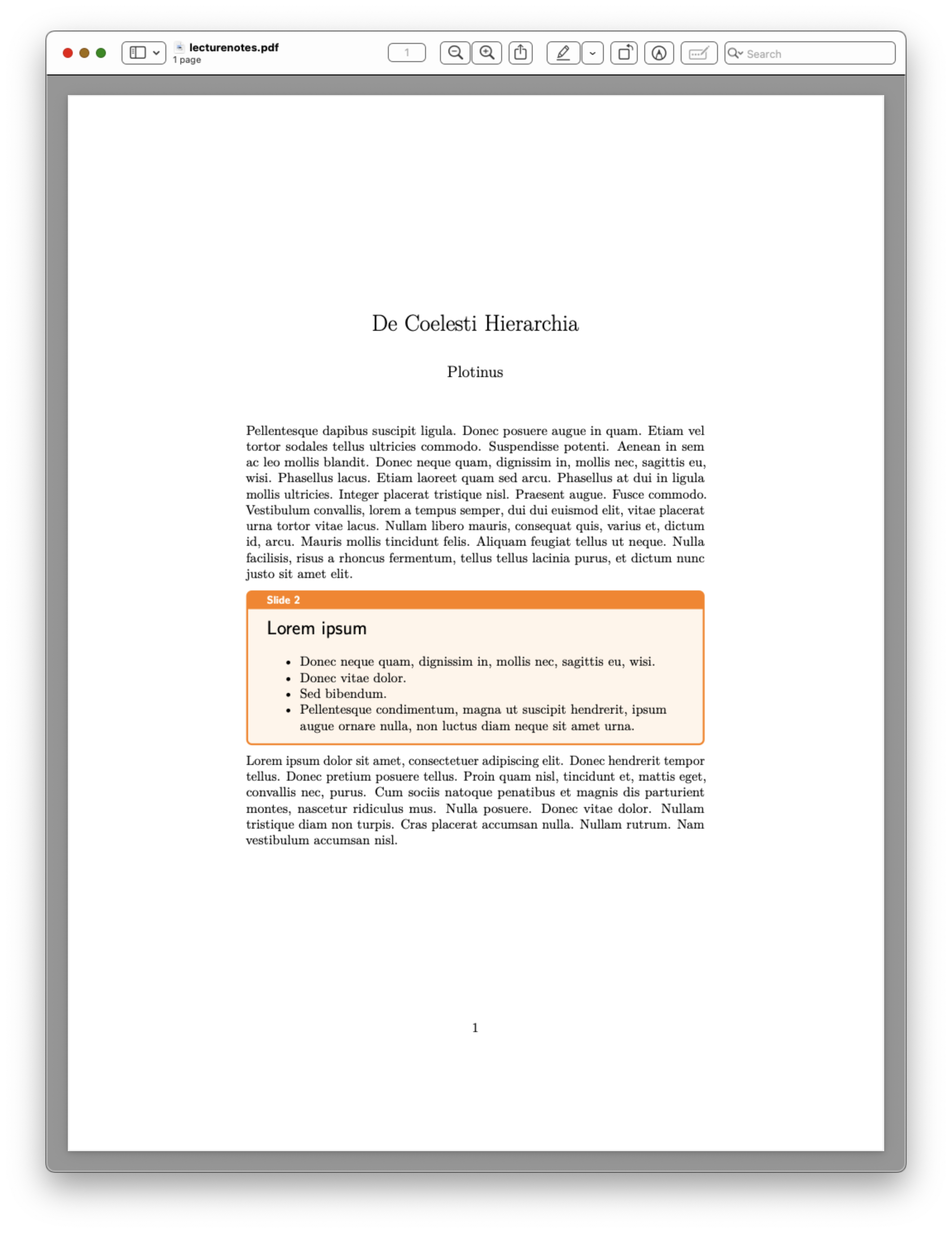
Lecture notes output.
Since we didn’t specify any further options, you get the respective defaults of Deckset and LaTeX (Deckset will just pick a random theme). Typically you’ll want to adjust settings, but this goes to show that you get reasonable results even without any configuration.
Conclusion
That’s really all there is to it. Well, you’ll probably want to adjust the look, and you may want to use additional filters. The pandoc-lecturenotes filters also add various features and let you set a number of options; one particularly useful feature for lectures and academic presentations provided by creating slides not directly, but with Pandoc and deckset-slides.lua are bibliographic references. And then I strongly recommend using make for building documents; if you aren’t using make yet, you can find an example makefile in the pandoc-lecturenotes repository. I also intend to write more about using make with Pandoc.
Everybody has their own approach; for example, if you just want to produce slides (and you read French), you may want to check out the post Diaporamas au format texte : un système modulaire et confortable by Arthur Perret, which gives a very good overview of his setup. But for me, Pandoc, Deckset, and these two little filters have made the creation of teaching materials not only more significantly more efficient, but also significantly more enjoyable and less stressful.